

Since both traditional and AI search engines use keywords as a jumping-off point when filtering results, it's incredibly important to know how to use keywords in your content correctly so that your content has a better chance of being found, indexed and ranked online.
Here at BKA Content, we've written hundreds of thousands of blogs (literally MILLIONS of words of SEO content) over the last 16+ years, and I've had a front-row seat to seeing what does (and doesn't) work when it comes to optimizing content for SEO.
While there are many opinions on how to use keywords for SEO, I want to provide you with a comprehensive, proven, step-by-step guide on how to correctly use keywords in any type of SEO content that you write/post on your site.
(When available, we use affiliate links and may earn a commission!)
How To Make a List of SEO Keywords
If you're new to keyword research, you may be asking which types of keywords to pick for your website to help increase SEO. This is a crucial step to creating an effective SEO strategy and there are many things to consider, including:
- Domain Authority and age of site
- The current site structure (# of pages, pillar pages, amount of content per page)
- Backlink Profile (# of backlinks as well as unique referring domains)
- The current organic keyword profile of your website (# of keywords ranking/relevancy of keywords)
- Business industry and Competitive landscape
It's imperative that you pick keywords that are relevant to what you do and are ones that you can actually win. You also need to make sure that you only select keywords where the intent of the searcher's query matches up directly with your products or services.
While we won't go into all of the specifics of how to do keyword research for your website in this blog, you can sign up for a keyword research tool like SEMRush (the one we use) to do it yourself, or sign up for a FREE SEO content audit where we can show you your site's current profile and do the keyword research for you.
🤔Don't have Semrush? Get a FREE trial with our affiliate link 👉 https://semrush.sjv.io/c/5714624/2022243/13053
Understanding Keyword Clusters and Keyword Hierarchy
Once your keyword research has been done, it's time to group them together into "keyword clusters" so you can start making informed decisions on what pages to create.

One of the biggest mistakes I see with people just starting in SEO is that they'll only select a single keyword per page! While there should be a "primary" keyword targeted, not focusing on any semantically-related keywords when creating the content is a huge on-page optimization mistake.
The more effective way to do it is to group related keywords together into "keyword clusters" so you can start making informed decisions on what pages to create.
What is a Keyword Cluster?
When creating keyword clusters, you're grouping semantically related keywords into a single topic/page. These are keyword phrases that may use different words that mean the same thing (i.e. "car" and "automobile") and that share the same user intent.
This allows you to create a more comprehensive piece of content that better matches the intent of the search query, uses multiple variations of the same phrase to give additional context as to exactly what your content is about, answers additional questions the user might naturally have, and increases your chances of SEO efficiency (ranking for the targeted term) and topical authority.
Especially in the age of AI search, having additional context and answering additional, very related questions, can help you to be served up in the AI overview more frequently.
Here is an example of a keyword cluster surrounding the topic of "how to use the Google Keyword Planner for Free":

How do I Prioritize Keywords?
Next, let's discuss the rules of keyword hierarchy. There are 3 main types of keywords for SEO that you can use in your prioritization for creating content:
- Primary Keyword
- Secondary Keywords
- Additional Keywords
We'll go into each of these different keyword subsets below and how they are prioritized/used.
What are Primary Keywords?
Your primary keyword should be the main focus of the entire article, so the title and ensuing content should reflect that. You can't really write a good piece of SEO content about 2 separate topics, so only one primary keyword should be used to drive the overall meat of the content forward.
That being said, in the age of AI search, context and "next questions to ask" really do matter. The best SEO content answers the exact question being asked and semantically related questions before and after it (this is where your secondary and additional keywords will come in). This is called "query fan out" and can really help your chances of having content being ranked in AI search with LLMs like ChatGPT, Claude, Perplexity and Gemini.

Last of all, your primary keyword doesn't always have to be the keyword with the highest search volume! In fact, most of the time it shouldn't be! Typically, I'll pick a longer-tail keyword phrase (i.e., 4-7 words in length) that is hyper-relevant to my target market as my primary keyword because:
- It provides the most context as to the intent of the user, therefore it's easier to create content that speaks to exactly that thing
- It is usually less competitive/easier to win
- Less traffic from a highly-relevant term is more valuable than more traffic from a broader, less-related term
The best-case scenario is to find a long-tail keyword like this that ALSO has relatively high search volume. Maybe the biggest mistake I often see people new to SEO make is that they continually target the WRONG keywords.
Avoid falling into the trap of only targeting high-volume, "sexy" keywords that you have no business winning. Instead, target keywords within the arena you can actually play in and make little wins all along the way. This is the secret to winning at SEO.
What are Secondary Keywords?
Secondary keywords are complementary keywords to the primary one, but typically just slight variations. Usually a main topic will include 3-5 main talking points so using a handful of those secondary keywords makes sense. These types of keywords also help to maximize the efficiency of your piece of SEO content.

Typically, secondary keywords would be frequently asked questions related to the primary keyword (albeit with lower search volume), or other closely related topics to the primary keyword phrase that would be relevant to the user.
These secondary keywords can help to reinforce the primary keyword (since they typically include variations of the primary phrase), or can pick up their own ranking on the page depending on their keyword difficulty and relevance to the piece.
There are many instances where secondary keywords may outrank the primary keyword on a page, which allows for a great opportunity for an SEO content refresh.
What are Additional Keywords?
Additional keywords are just any other related keywords that are phrased or spelled differently than the first two but mean the same thing. This is a catch-all net to get different variations of your main keywords in there to try and rank for one (or all) of them.
Typically, very "long-tail" keywords would be included in this category.
How Many Keywords Should You Use On A Page for SEO?
In most cases, it would be 3-8 total, if you're writing 500-1000 word pieces of content. This breaks down into 1 primary keyword, 1-3 secondary keywords and 1-4 additional keywords. This gives you a fighting chance to start ranking for one of them and then further down the line you can even reoptimize your content based on what it's currently ranking for at that time.
Here's a quick chart outlining # of keywords that could be used based on the word count of the SEO article or blog you're writing:
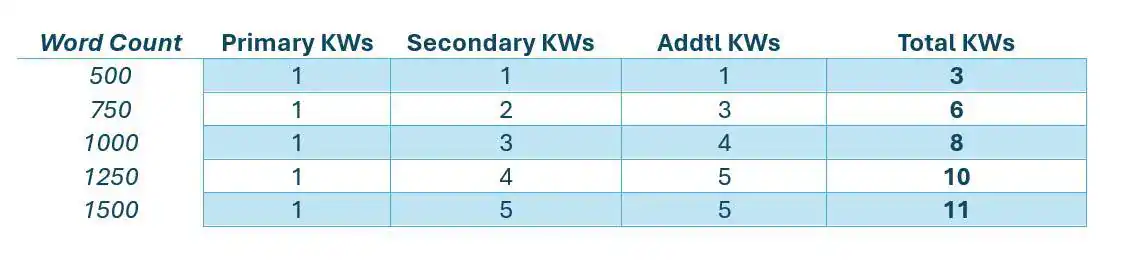
Using more than 8-11 or so keywords (assuming you don't have either insanely long content or extremely short content) can come off as spammy. It's also incredibly hard to naturally incorporate that many keywords for SEO into writing, and really isn't necessary.
As was mentioned before, if you try to include TOO many things in a single blog you'll likely confuse Google on what your blog is actually about and you may not rank for anything. On the flipside, you may rank for lots of keywords with a guide like that, but because the SEO content doesn't have a clear focus, you won't rank high enough for any of those keywords to be rewarded with any traffic.
What you'll find is that related keywords will naturally and automatically come up when writing content based around a few really good keywords. Doing more than this usually hurts readability and sticks out like a sore thumb to readers as well as to Google's page crawlers.

Where to Use Keywords for SEO in Your Content Writing
It's easy to just say "you need to add keywords for SEO", but implementing them is a different matter entirely. In fact, there are certain rules and best practices for adding keywords to a website that can make your SEO efforts much more worthwhile.
You should insert keywords into your content writing using the following steps:
1. Use Keywords in Your Meta Description
This is one of the most basic ways to add keywords for SEO, but it's often overlooked. The meta description acts as a simple summary to describe what the content is about, so placing the keyword in this summary helps Google to better filter your results. It's a powerful way to get 1 or 2 of your most important keywords attached to the part of your page that's directly served up by search engines.
As a refresher, a Meta Description is a 160 character (or 20-25 word) description of what your page is all about. This description is what typically shows up under a page name and URL when people search for a keyword phrase on search engines. Here is an example of a Meta Description as it appears on the Search Engine Results Pages (SERPs).

How to Use Keywords for SEO in a Meta Description
First, it's important to have the right tools. If you're using WordPress, try downloading the Yoast SEO Plugin. This little plugin allows you to quickly optimize your content for both SEO and readability, as well as gives you spots to enter in your Meta Description and SEO Title Tag (see step #2).
Next, when using SEO keywords in a meta description, make sure to use the primary keyword at least once, but no more than twice. Be sure to prioritize a helpful, enticing description over keyword stuffing, though, since this is the first thing someone will read before ever visiting your website.
SEO Pro Tip: If you can get a secondary keyword in your meta along with one instance of your primary, you're killin' it when it comes to using keywords for SEO!
2. Insert Keywords in Your SEO Title Tag
Keep in mind, I said SEO title, not your main article title. You'll be optimizing that in just a minute. First things first, let's get some helpful keyword data in your SEO title tag (also known as a meta title tag).
This title tag is similar to the meta description in that it is the name of the page that users will see on search engine results pages (SERPs) when they search a keyword phrase. This title will be clickable from the SERPs and will take the user directly to your page. Here is an example:

How to Use Keywords for SEO in a Meta Title Tag
Similar to meta descriptions, you only have a few characters (about 50-60) to use when writing your SEO title tag. Because of that, you typically want to limit your title tag to just your primary keyword as well as your company name. This is the most concise, user-friendly and SEO-friendly way to execute it.
Ideally, you've set up your site structure where the main keyword naturally fits as a description of what your page is about. You don't want to employ any bait and switch tactics of calling the page one thing in the normal title and disguising the main keyword in the title tag.
This is confusing to both Google (and users!) and ultimately won't net you anything.
3. Use Keywords in Your Article Title (H1)
If possible, put the keyword in the title of your page. Since Google pairs this title header with your meta description to paint a picture of what your content is about, having the keyword in the title is very helpful as long as it can be used naturally.

If the keyword can't be used naturally in the title, use a variation that still gets the point of the article across while hitting some of the main words from your keyword phrase. A little is better than nothing!
Pro SEO Tip: Your page title is also commonly referred to as your page's H1. Heading structures can be an incredible optimization opportunity when it comes to your website's SEO real estate and should be used! That being said, from an on-page SEO perspective, you should NOT Be using more than one H1 on your page/blog/article.
After your title, you should be using H2s, H3s, and H4s to help organize additional headings in your article (see more on that below). While Google has a history of publicly downplaying organic ranking factors like headings, the truth is that they matter. We've tested hundreds of blogs across sites where the only change made to an existing piece of content was optimizing headings and we've seen rankings rise. It makes sense. HTML tags help Google to index a site quickly, and since headings should summarize the content to follow, they hold more weight than paragraph text in a piece of content.
4. Use Keywords Within the First 200 Words
Many experts believe that Google gives more weight to the first 200 words in your content. The reason why is because usually the first 100-200 words of an article are where a content writer sets up the introduction of what will be discussed.
Since most readers only continue on in an article if the introduction is good, it stands to reason that it could be a ranking factor as well.
Pro SEO Tip: If the content you are writing is a blog and not a web page, you may want to consider inserting a "Key Takeaways" section as the first thing under your article title, summing up your article in about 3 bullet points. This works really well for coming up in AI search.
That being said, I'd focus on keyword optimization in the introduction right AFTER the key takeaways. This is because your article summation will likely use multiple variations of your keywords already.

Where to Use Keywords in an Article Introduction
Knowing that Google scrutinizes the first 200 words of a blog post, it's very important to make sure that you put your primary keyword within the first sentence or paragraph, if at all possible, without sacrificing the quality of the content. Similarly, you should try to use at least one secondary keyword in the first 200 words as well (though not in the first sentence).
Keep in mind that Google is trying to get an overall picture of what the article is all about, and the way you outline your content really matters. You have to be careful to lead Google to the keywords you want it to focus on and not confuse it when optimizing content for keywords. This means your primary keyword should live in all the most important places, your secondary keywords next, and then any other additional keywords after that. Think of it as a pyramid of usage, with primary keywords at the top.
The focus of the article (and introduction) would be the top of the primary, filled in by secondary and lastly additional keywords to make up an entire keyword structure and strategy for that piece.

5. Insert SEO Keywords Naturally Throughout the Article
In a seemingly SEO-centered digital world, it's easy to forget that the reader actually comes first. You should never compromise your reader's ability to be engaged, informed and enlightened by your content because of bad keyword placement. But believe me, it happens all the time. Here is one solution to help you write your keywords more naturally in your content.
Use Stop Words in Awkward Keyword Phrases
One way to help you write keywords more naturally is to utilize "Stop Words" in your keyword writing. These are words that can be added within keyword phrases to help them read more naturally without decreasing their ranking value. Search engines like Google recognize these words as fillers and allow for them without hurting your SEO optimization.
For instance, if you had a keyword phrase you were targeting that reads "plumbing Salt Lake City", there is literally no way you can insert it into your content exactly as-is without it either looking like a typo or a blatant keyword insertion. The better way to add keywords for SEO is to use a stop word in that phrase. Adding the stop word "in", would now have it read "plumbing in Salt Lake City", which can much more easily be inserted into natural writing. Try it out!
You can easily find a list of commonly used stop words you can utilize when adding keywords to your website.
How Many Times Should You Put Keywords in Your Content for SEO?
While we covered total # of individual keywords you may want to insert throughout your article, this question is referring specifically to how many times you put each of those keyword in an article. This is a great question that's often discussed and argued about among SEOs.
The real answer is that it completely depends on the types of keywords you have and the length of your content.

The general rule, however, is you should try to include your primary keyword (or a variation of it) about once every 100-150 words. So if you're writing a 1000-word article, inserting the primary keyword around 5-7 times would be appropriate.
Also keep in mind that you want to fairly distribute these instances of the keyword throughout the article. You don't want all 7 instances of your primary keyword in the same 200-word section, or you lose the flow of a consistent keyword theme throughout.
Secondary and Additional keywords, however, shouldn't be in the article more than your primary keyword. Whatever your baseline is for using your primary keyword in your content, decrease by about 25-50% for secondary and another 25% for additional keywords for SEO. Then you can keep a healthy keyword structure that Google crawlers should easily be able to follow.
6. Use Keywords in the Last 200 Words
Similar to how an introduction of an article is important to keyword rankings because it sets the framework for the content, it could be argued that the conclusion (or last 200 words) is just as important, if not more important. For this reason, try to include your primary keyword again near the last or second-to-last paragraph and include a secondary keyword if possible.

For blog posts, it's usually good practice to include a call-to-action (or CTA) in the very last paragraph, so if you can fit the primary keyword there, great! If not, get it in that second-to-last paragraph as we talked about above.
7. Use Keywords in Headings (H1s, H2s, H3s, etc)
We mentioned this briefly above, but headings are a formatting tool that most text editors offer to allow you to help break up your text. From a purely visual standpoint, they are a must-have.
Huge chunks of paragraph content with no end in sight are intimidating and often skipped completely. Using headings to break up content allows you to visually move the reader along to the most important points, or the ones they are most interested in.
From an SEO standpoint, headings might be even more important. The HTML tags used to identify H1s, H2s, H3s, etc are also ranking signals for Google to know what's most important in the content. Adding keywords to headings in content may be the single best way to try and rank for multiple keywords.
The more content you have, the more headings you have. Depending on the intent of the keyword phrase longer content may rank better than shorter content, or vice versa.
When a keyword is used in headings, it brings more emphasis to the meaning and importance of the keyword. This helps the search engines to know how relevant those keywords are to your content. Here's an example of where to find heading formats in a text editor:

How to Add Keywords to Heading 1s (H1s)
We covered this above, but Heading 1s, or H1s, are typically reserved just for the main title of the article. If you use multiple H1s in your content, you're basically asking Google to get confused. Instead, just stick to a single H1 as your article title with your primary keyword included.
How to Use Keywords in Heading 2s (H2s)
Heading 2s, or H2s, are where you can do the bulk of inserting important keywords. H2s are the headings that break up the main sections of your content and usually come into play every couple of hundred words.
For a 1000-word article, you can plan on around 3-5 of these H2s. This is where you'd want to include the primary keyword again in one of them and reserve the rest for secondary keywords you are targeting.

How to Insert Keywords to Heading 3s (H3s)
Heading 3s, or H3s, are used to help break up and list individual points in the main sections. You might find H3s in the form of numbered lists or clarifying sections to an H2 heading.
This is another good place for an instance of the primary keyword, but probably a better spot for secondary keywords and any additional keywords you have.
8. Use Keywords in Anchor Text Links (Although Not the Ones You'd Think)
When a keyword is used as an anchor text link in your content, it implies that there is a place to find even more information regarding that word. This helps to place added emphasis on the keyword and the relevance it has to the content it's being linked to. So how does that apply to the article you're currently writing?
Well, it doesn't. Not exactly. Using keywords as anchor text links in your articles can help OTHER pages on your site. This is also known as creating an internal link structure showing Google where the most important articles are for exact keyword phrases.

If you can plan your content accordingly, you know you can use anchor text links of certain keyword phrases to drive the authority of other "pillar" pieces.
SEO Pro Tip: Do NOT use your primary keyword (or variation of it) in anchor text that is linking to another page unless you've completely given up hope of ranking for that keyword on that page. Doing this basically tells Google to ignore that keyword on the page you're working on and to look for it in the page you're linking to. This is a common mistake that a lot of content marketers make.
Instead, find a related topic within your article with an associated keyword that you can link to another page to help improve it's authority for that keyword. For any of the main keywords you hope to rank for on the page you're working on, DO NOT LINK out to other pages using them as the anchor text.
9. Use Keywords in Image Alt-tags
First of all, if you aren't using images in your content, then PLEASE do so! I can't overemphasize how many opportunities you're missing out on if you aren't using some kind of visual cue to help educate, engage and inform your readers and prospective clients.
Images and content (and videos for that matter) are a perfect marriage when it comes to user engagement.
Second, using keywords in alt-text on images is an incredibly simple way to get another keyword variation on your page without it looking spammy. While there is debate about how much this will move the needle, when you're creating content on a world wide web with trillions of pages of content on it already, any little thing you can do to stand out is worth it IMO.
How to Use SEO Keywords in Alt Tags
In terms of keyword usage, using your keywords in an image alt-tag can help it to be shown during image searches. This can help users to be led to your content in a round-about way.

Not only do images help break up the text and give it color, personality and sex appeal, they also can be a great opportunity for you to add keywords for SEO to your website. Take advantage of putting images in your articles and the blessed alt-text you're allowed to manipulate.
SEO Pro-Tip: In an effort to make sure all your efforts are white-hat and still provide value to a reader for accessibility reasons, make sure that your keyword variation you use in an image's alt-text still explains something about the image. If the picture is of a puppy, please don't put in the alt-text "SEO Keyword Guide".
Try and be creative to find a way to still include a couple of descriptive words about the text along with a variation of the keyword. Ideally you've chose images that directly relate to the topic of your article so this shouldn't be too tough to do. Here's an additional guide on how to write alt-text for SEO that explains this.
10. Use Keywords in the URL
Last, but not least, when it comes to adding keywords to your website to maximize your onsite SEO, you should always try to put your primary keyword in the main page URL of the article you've written.
If you've done the steps above and put your primary keyword in the title of your article, it should be in the URL automatically when you go to publish it. But even if your title is similar to the main keyword but doesn't include it completely, you should tweak your page URL to include it after the fact.
Here is an example:

There has often been talk among SEOs and content marketers of whether or not it's necessary to put your primary keyword into your page URL and if it affects rankings. Based on a study we did here at BKA Content, analyzing around 60 posts over a 6 month period, the posts we had with a keyword as a part of the page URL were overwhelmingly ranking for that exact keyword, where posts that didn't have the targeted keyword in the URL did not.
That's enough evidence for me that it IS effective to include the keyword in the page URL.
SEO Pro Tip: During that same content marketing study we did here at BKA Content, there were some concerns that changing the URL after the fact might hurt any existing rankings we had for that page and that the page might not recover. After changing the URL after the fact (while always including a redirect from the original URL), there was always an immediate drop in tracked rankings in our keyword tracking tool, but it never affected our actual site traffic.
In fact, almost every page that had the URL adjusted ended up rebounding in about 3-4 weeks in our keyword tracking tools to rank for more keywords than they were originally.
WARNING: Avoid Keyword Stuffing
There can be too much of a good thing! Part of the skill of optimizing keywords in your content includes showing restraint.
The point I'm making is this: Don't overuse keywords for SEO. I cannot stress this enough. Google is much smarter than it was in the early years of search and can easily tell if you are keyword stuffing for SEO purposes, or if you are using keywords in a legitimate way to help readers find relevant information to help answer their questions.
How to Check Keyword Density in Your Content for SEO
One easy way to check for this is simply to press CTRL-F on your keyboard. Type in the keyword you want to check and see how many times it's highlighted and make any adjustments as necessary:

If Google suspects you are just using keywords for SEO and not for user intent, you will get penalized. Usually this means that your content won't be indexed, rank, etc. Keyword stuffing is never worth it, so don't waste your time doing it.
When deciding how to use keywords for SEO, always err on the side of what's good for the user. Google is constantly trying to adjust its algorithm to provide better answers to user queries. If you've decided to utilize a super awkward version of a keyword in a piece of content just because the Search Volume looked sexy (even though it doesn't make sense on the page), you can expect to fail.
Track, Refine and Use Different Keywords In Content If Necessary
Last of all, don't forget that you can go back and re-optimize your posts in a few months once the dust has settled. Give your content about 3 months before you decide to make any real changes, then go and see what keywords it's ranking for and what's gained traction, and optimize further from there. If your post is ranking better for a secondary or additional keyword than the initial "primary keyword", then switch your primary keyword for SEO!
Just be sure to be careful about making massive changes or you could end up capsizing the entire boat. Engage in the art of On-page SEO and make small changes to optimize keywords and see if the results are favorable. Do this over and over again and you'll have a really fine-tuned SEO content strategy on your hands.

Conclusion: How to Use Keywords for SEO
- Focus on 3-8 keywords total per 500-1000 word article (includes primary, secondary and additional keywords).
- Add keywords to Meta Descriptions, Meta Title Tags and page URLs.
- Use keywords in title, headers, Alt-Image tags.
- Insert keywords in the first and last paragraphs and evenly throughout.
- If a keyword doesn't work naturally, don't use it. Keywords should be relevant and highly applicable to your content, if the word is odd or doesn't fit, use the correct version of it that makes sense or throw it out.
- While keywords are great, focus on making content that matches the intent of the user query. Keyword-riddled content with little to no value helps nobody and Google will not rank your content for that query.
So there you have it, basically everything you could ever want to know about how to use SEO keywords in your writing. Next, you might be interested to find out how to add keywords to a YouTube video!
Have anything to add about using keywords for SEO? Leave it in the comments below!
Or, if you're wanting to learn more about SEO content strategy and how to create a step-by-step framework that gets real organic results, you can join our Skool SEO community where we offer DIY SEO courses and break down exactly how to create content on your website that ranks.

- How to Track AI Traffic in Google Analytics (Step-by-Step Tutorial) - March 24, 2026
- How To Use Keywords in Your Content for SEO - February 2, 2026
- The 10 Best Digital Marketing Agencies In Utah: 2026 List - January 6, 2026

Hi, Greg!
Excellent explanation on how to use keywords throughout the content. Thanks for posting this awesome content.
Thanks for sharing the detailed post about SEO. The content is very informative. Definitely, it will help every search engine optimizer for improving their SEO services skill and boost their business online.
Great Information, thanks so much
Tnx for great tips.
could you explan the following tip:
SEO Pro Tip: If you can get a secondary keyword in your meta along with one instance of your primary, you’re killing it when it comes to using keywords for SEO.
does it means dont use od secoundary keyword?
No, it means using the secondary keyword is a good thing.
Sir/Mam you are doing good work. I really appreciate you.
This is a really good tip particularly to those fresh to the
blogosphere. Simple but very accurate information… Thank you for sharing this one.
A must read post!
This is an amazing article.
This is one of the biggest issues that we face during the SEO project Execution. You explained it very nicely.
Thank you so much!!
Thank you for this !
Good knowledge to keep in mind.
This was a great article & it is really helpful. thanks for your efforts to keep us updated 🙂
This was a great article and really explained to me how I should use keywords properly in my posts. Thanks!
This is a superb explanation. Thank you so much for sharing how to use keywords in the website or blogs.
Really very nice article.
Very helpful article for me. I was searching for this topic because I am a blogger in the beginner stage. Now I will use these methods for my blog. I hope it will diffidently work for me.
Hey, Thanks for sharing this article. It is very valuable to beginners. I will share this with my colleagues. Keep Posting. Have a good day!
Great content many don’t say it as it is the way you did am already a PRO on page SEO article writer with this tip
Wow Superr!! looks absolutely amazing.. beautiful pictures too.. 🙂 thanks for sharing..
Thanks, this is exactly what I was looking for!
I am searching google how to write content with keyword then i am find your blog and open your content very useful information, thanks for sharing 🙂
Great SEO information Greg Secrist,
I appreciate your time and willingness to share some of the knowledge you have accumulated over the years.
Thank you, Jay
This is about the best article on this topic. I have searched and read many articles, by Neil Patel, Search Engine Journal, etc and I have always felt something is still missing. But you just nailed it completely. The way you explained how to integrate primary, secondary and other keywords into a post and not making it look obvious is really simple.
I have a post on my website that draws many keywords on the first page in google serps and some on the second page and I found that those on second page are only mentioned once in the post while some still are not mentioned. This article just showed me how to integrate many more keywords into that post. Thanks.
I am a beginner and this article saves me time in writing the right article with proper keyword space.
This is about the best article on this topic. I have searched and read many articles from Neil Patel, Search Engine Journal etc. and I have always felt that something is still missing. But you got rid of it completely. The way you explained how to integrate primary, secondary and other keywords into a post and not make it clear is really easy.
Nice information.
I am biginer and this article save my time to write right article with proper keyword placement.
All points mentioned here are fantastic! I followed your suggestion and get traffic on sites. Thank you for such an informative article.
All points mentioned here are fantastic! Thank you for such an informative article.
Thank you, now i know how to place certain keywords on my article
Great It’s a lot of helpful for me. thanks for sharing experience.Good work
Amaaaaaaaaaaaaaaaazing content WOW. I’m so relieved, I understand much better now how SEO works, practically. Thank you Matt!
Hi,
Thank you for your article.
Where can I find keywords list for my beauty online magazine?
Hi, Celine:
Answerthepublic.com is a good, free start.
Best,
Amber
very nice content