Key Takeaways
- Your Google Business Profile description impacts your visibility in the map pack.
- An effective description clearly lists the locations served and main services offered.
- Optimizing this section helps Google understand your business context better.
- Using tools like ChatGPT can streamline the description writing process.
- Updating your description can improve rankings, especially in smaller markets.
If your local business isn’t showing up in the map pack, your Google Business Profile description may be the reason.
This is one of the most overlooked sections of a business profile. Many businesses skip it entirely, stuff it with keywords, or write something vague that never clearly explains what they do or where they do it. When that happens, Google has a hard time understanding the business, which makes local rankings much harder to earn.
In this post, you’ll learn how to optimize your Google Business Profile description the right way using a simple formula and free tools. This approach is based on real client results, not theory. By the end, you’ll know exactly how to write a description that gives Google clearer location and service signals and improves your chances of appearing in the map pack.
Where to Find Your Google Business Profile Description
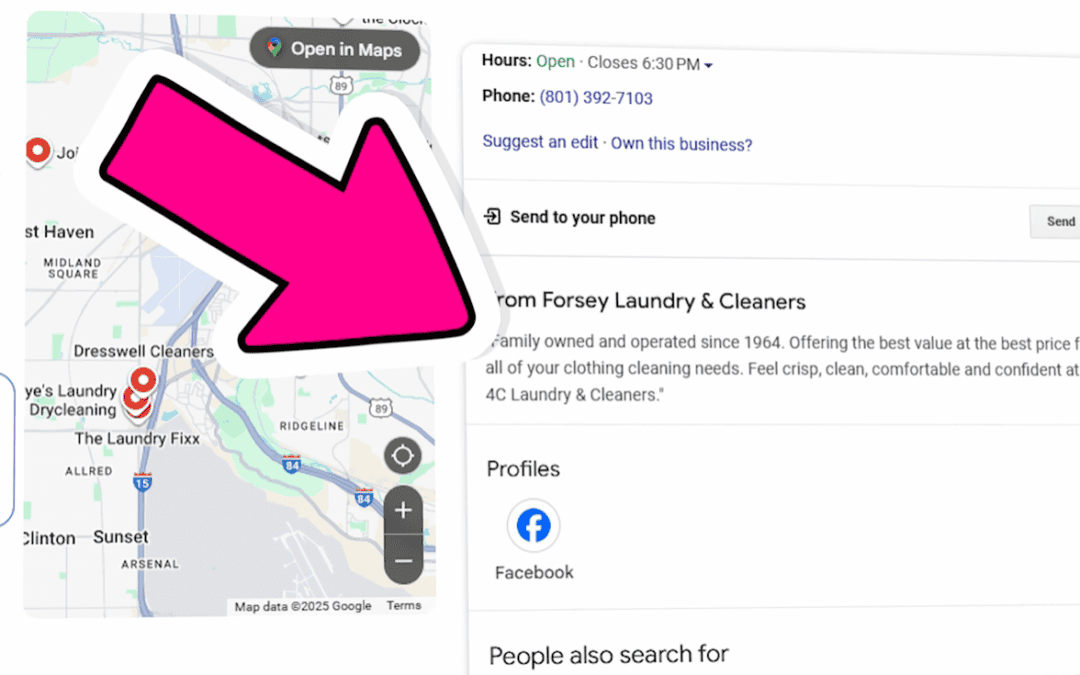
To edit your description, log into your Google Business Profile and click Edit profile. From there, scroll until you see the Description field.
That’s the section we’re focusing on.
The Simple Formula That Works
An effective Google Business Profile description follows two rules.
First, clearly list the cities or areas you serve. Second, list the services you provide.
That’s it.
You’re not trying to sell someone or write marketing copy here. You’re giving Google clean, direct context about your business.
What an Optimized GBP Profile Description Looks Like
A strong description starts with location.
For example, a home builder might say they specialize in building custom homes throughout a specific region and then list the cities they serve, followed by “and surrounding areas.” This immediately tells Google where the business operates and helps it connect the business to searches happening in those locations.

This matters because map pack results are heavily influenced by proximity. If your description never mentions a city someone is searching from, Google has very little reason to show your business in that area.
After listing locations, a short credibility line works well. Something simple, like how long the business has been operating or a brief statement about experience, is enough. There’s no need to list awards or go into detail.
Next, the description should clearly list the main services offered. This helps Google match your profile to relevant searches. If you offer multiple services but never mention them in your description, Google may only associate your business with one service based on your business name or primary category.
Why Descriptions Still Matters If You’ve Added Services and Service Areas to Your GBP
Google Business Profiles already include sections for service areas and services, so it’s common to wonder why the description matters at all.
The reason is context.
Your service areas and services act as structured data, but your description reinforces what you believe are the most important locations and offerings. Think of it as an extra layer of clarity. You’re confirming to Google where you work and what you want to be known for.
If you serve more than five locations, it’s best to list your top five in the description and rely on the service area section for the rest.
Writing Your GBP Description Faster With Free Tools
You don’t have to write this from scratch.
Tools like ChatGPT already understand what a Google Business Profile description is, including character limits and structure. The key is giving the tool enough information.

At a minimum, you should provide your business name, the services you offer, and the cities you serve. From there, the output usually gets you most of the way there. You’ll just need to review it, remove services you don’t offer, adjust wording for accuracy, and tighten clarity where needed.
AI works best when it’s guided, not when it’s asked to guess.
Does Updating Your GBP Description Actually Help SEO Rankings?
Yes, especially in smaller or moderately competitive markets.
In one example, an electrician wasn’t ranking in the map pack for a specific city simply because that city wasn’t mentioned anywhere in their profile. After updating the description to include that location and nearby service areas, the business moved into a top map pack position within about 30 days, without any other changes.
In highly competitive areas, updating your description alone may not be enough. However, if your description isn’t optimized, your chances of ranking are already limited.
This Is Only One Part of Local SEO
Optimizing your Google Business Profile description is an important foundational step, but it’s not the entire local SEO strategy. Reviews, categories, website content, links, and consistency all play a role.
If you want to learn the EXACT local SEO framework that our experts use to help our clients rank higher locally, then join our Skool community to unlock the best Local SEO Course.👇
Or, if you want SEO experts to help do all this for you, contact our Local SEO services experts to get a FREE SEO content audit and consultation to outline what a custom local SEO package might look like for you!

- The Hidden SEO Problem That Content Couldn’t Fix - March 30, 2026
- BKA Content Co-Founder Speaks About SEO At Weber State University - March 18, 2026
- The SEO Strategy That Generated 15,000 Rankings - March 9, 2026